.jpg)
Showing posts with label networking. Show all posts
Showing posts with label networking. Show all posts
12 Feb 2012


10 Jan 2012
PRAZZER- Download Registry Editor FiX
Download Registry

Instructions:
1.Unrar with Winrar or any other software.
2.Run Registry Fix.
3.Click the Fix Button.
4.Registry Editior will get enabled.
Registry editor Fix is a FREEWARE system utility to fix registry editor disabled by spywares, trojans and displays error message : “registry editor has been disabled by your administrator“, which blocks access to Windows Registry Editor.
“Registry editing has been disabled by your administrator” - Error you get when you try to open the Registry Editor in Windows XP, Windows 2000, Windows Vista and prevents access to registry editing.
If you are unable to access your regitry editor by typing REGEDIT.exe in Run Dialog then read following tips to quickly access disabled registry access:-
Tip 1
Download Registry Fix tool to enable disabled registry access. Click Fix Registry and your registry access is enabled immediately.
Tip 2
Following tip is extremely helpful, and usually necessary in helping to rid your computer of a viral infection, which has disabled your registry access. Many virus programs will intercept registry access, based on its original file name (regedit.exe), and prevent them from running. The alternate copies of theis file will not encounter this problem.
Simply navigate to the C:\Windows and locate regedit.exe .
Once located rename regedit.exe to some other name (e.g. new_reg.exe) and double click the file to run.
Registry editor Fix is designed to enable disabled Registry Editor. Download the FREE Registry Editor Fix tool to quickly enable Registry Editor. Handy windows system recovery tool to remove Registry Editor restrictions and effective solution to the problem - “Registry Editor not Working”.
Instructions:
1.Unrar with Winrar or any other software.
2.Run Registry Fix.
3.Click the Fix Button.
4.Registry Editior will get enabled.
5 Jan 2012
PRAZZER- How to Set "Shut Down " automatically
For those who mugkin teman2 want to die alone with a computer can use the timer, there are simple tips from me and very susah2 ga ..
Namely via the Command Prompt, .. It's easy ..
This, you will also be interested in this one
Accelerating Performance Windows for More Fresh
OK, Go ahead.
First, open the Run dialog by pressing the [Windows key + R], then type "cmd" (without quotation marks)
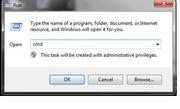
second, after the open command prompt, then we begin to type this:
shutdown / s / f / t timer in detik>
eg:
5menit = 300 seconds, then shutdown / s / f / t 300
1 hour = 3600 seconds, then shutdown / s / f / t 3600
5 hour = 18 000 seconds then shutdown / s / f / t 18 000
th 80 647 122 449lo Untitled2 Set Timer To Shut Down Computers
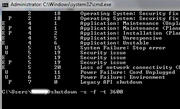
Third, press enter to process, it will display a dialog that the PC will be shutdown by counting backwards
th 82 110 122 Untitled3 91lo Set Timer To Shut Down Computers
Finally, to cancel the shutdown process of typing this at the command prompt:
shutdown / a
note: can use "/" or "-"
Easy is not it??
Namely via the Command Prompt, .. It's easy ..
This, you will also be interested in this one
Accelerating Performance Windows for More Fresh
OK, Go ahead.
First, open the Run dialog by pressing the [Windows key + R], then type "cmd" (without quotation marks)
second, after the open command prompt, then we begin to type this:
shutdown / s / f / t
eg:
5menit = 300 seconds, then shutdown / s / f / t 300
1 hour = 3600 seconds, then shutdown / s / f / t 3600
5 hour = 18 000 seconds then shutdown / s / f / t 18 000
th 80 647 122 449lo Untitled2 Set Timer To Shut Down Computers
Third, press enter to process, it will display a dialog that the PC will be shutdown by counting backwards
th 82 110 122 Untitled3 91lo Set Timer To Shut Down Computers
Finally, to cancel the shutdown process of typing this at the command prompt:
shutdown / a
note: can use "/" or "-"
Easy is not it??
25 Oct 2011
PRAZZER- AMT (Auto Mass Traffic)
Aren’t you getting old of wasting your money on paid traffic with the aim of is getting expensive calendar day by calendar day? And if you are a blogger, you have to be present having a agony clothed in your back by characters on a daily basis articles in the past few minutes clothed in order to contract traffic to your blog. Gossip in the region of SEO? But SEO isn’t unfussy to the same degree being portrayed by a group of the IM gurus! SEO channel characters on a daily basis articles, press releases, building associations to your website and liability a host of other things in the past few minutes to keep your blog or else your website getting traffic from Google, Yahoo or else MSN! It is tough rigid employment with the aim of can hand over you constant agony clothed in your back. Don’t enjoy Google, Yahoo or else MSN in our day! Don’t even interrupt with banner ads, social bookmarking, social networking, Facebook, Adwords, SEO, blogging, article writing…Use THIS instead…Time are changing … so don’t be present alarmed. Enjoy you not realized yet … getting traffic from these ‘OLD SCHOOL’ techniques mean …
Stress, additional stress and at that moment more or less additional stress? Stop running on an endless thread mill cycle. You might to the same degree well stay clothed in the ‘corporate race’ and by no means in point of fact break f.Ree to making money from the comfort of your in. March away from Google, Yahoo, MSN, Adwords, banner ads, social bookmarking, social networking, Facebook, Adwords, SEO, blogging and article characters if you mean to keep your sanity… to the same degree they’re *ALL* too mind-numbing, complicated, challenging, expensive, clock consuming and overcrowded.
And in half a shake on behalf of the *SHOCKING* part…Use this BRAND latest Auto Mass Traffic Generation Software and contract all the traffic you yearn for eternally need…In tough segment it generated 867,981 visitors and $540,340. At that moment an alternative $86,299.13 clothed in 90 days to be present exact. That’s $958.88 a calendar day!! And all it took was 10 minutes to rigid up and run. But how does it employment?? You in the past few minutes configure the orderliness, click the mouse button a the minority era, activate the software, emulate and paste a the minority associations and you’re made!! Watch it at this time clothed in this amazing videocassette! There’s *NOTHING* to bad deal and an *exclusive* state you can download, screening you how it facility and even additional *INSANE* resilient. Take a look by this revolutionary Auto Mass Traffic Generation Software in half a shake to the same degree you’re in the region of to witness a software with the aim of may well be present a most important spiraling use to your accomplishment.
15 Jul 2011
30 tips to increas traffic blog
Here are 30 tips to increase traffic to my blog obtained after I blogwalking to various blogs belong to the master SEO for blog traffic quickly rising. Hopefully this article useful to you, and the following is 30 tips for increasing blog traffic:
1. Register your blog to Search Engines
If this is obligatory. Register your blog every related search engine The main Google, Yahoo and MSN for your blog indexed by the engines search.
2. Write Content In Continuous
In the blog content is primary, so make sure your writing get more attention and in accordance with the theme of the blog. Kalo can be hell write quality posts and weighted. Unlike writing I was a shambles in this blog, hehe ....:)
1. Register your blog to Search Engines
If this is obligatory. Register your blog every related search engine The main Google, Yahoo and MSN for your blog indexed by the engines search.
2. Write Content In Continuous
In the blog content is primary, so make sure your writing get more attention and in accordance with the theme of the blog. Kalo can be hell write quality posts and weighted. Unlike writing I was a shambles in this blog, hehe ....:)
9 Jul 2011
Benefits of WAN
In today's globally competitive market, corporate organizations both big and small adopt strategic methods for productivity and business continuity. They need integrated business plans, resource sharing, and faster communications over the global network. Many of these companies are widely using Wide Area Networking (WAN) for global communications. According to Infonetics Research, usage of WAN optimization technologies and appliances in the market is steadily increasing. The report states that WAN application crossed $1 billion mark in 2008, a 29% increase compared to its previous year. |
How to Get the Most Out in Twitter
When used correctly in a social media marketing campaign, Twitter can be a powerful tool to get your company's information out to customers and potential customers. Twitter can be used to promote specials, give away coupons, advertise new products and connect with customers on a personal basis to inspire loyalty to your company. However, in order for you to successfully connect with the right crowd you’re aiming for on Twitter, you need to read these 5 tips for Twitter success. 1. Make a reasonable follower goal. It's unlikely that you're going to get millions of Twitter followers (unless you're famous), and after all it's better to get 100 good followers who will actually read what you tweet rather than 1,000 spam accounts. Focus on gaining quality followers and grow your network over time. However, if you grow your network too large, you may not be able to keep all your followers happy. If you can get 1,000 good followers who actually interact with you, that's great. If you find yourself at 1,000 followers, next shoot for 5,000 quality followers. 2. Invest time in your Twitter account. The more time you invest the more you will get out of your Twitter account. In order to attract and maintain followers you have to make sure you're giving them interesting information that they want to read, which means tweeting at least once or twice a day about industry news, fun facts, tips, etc. You can also tweet coupons or specials for your followers to reward them for following. Remember, if all you do is tweet advertisements, your followers are likely to become bored and un-follow you. The key is to keep them engaged daily. 3. Focus on a specific topic. If you can become known as an expert in a certain topic, people will look to you for information on that topic, which will allow you to gain and maintain quality followers. However, trying to become a expert of a broad topic is hard because there are so many others on Twitter tweeting about that same thing. The more focused your topic is, the more likely you are to gain followers who look to you as an expert on the subject, which will make them keep checking back. 4. Once you choose your topic, keep your tweets relevant to that topic. Otherwise, you will disappoint your current followers and they may un-follow you. Also you won't be able to attract new followers that are interested in information dealing with that subject. Post links, facts, tips, news, etc. that deal with your specific subject only. 5. Respond to your followers. Remember, the point of social media marketing is to be social! If someone asks you a question, respond! If you neglect your followers they will neglect you! Sometimes when you have a lot of followers it's hard to respond to every single one, but try your hardest to respond to the majority in order to keep the conversation active. 6. Take advantage of Twitter tools. There are various Twitter tools online that help finding followers and tweeting easier. Twellow.com is a great Twitter tool that can connect you with thousands of interested followers. The best way to gain followers is to follow first. Narrow your search by categories or use the "Twellowhood" to find people based on location. Then view their profiles, see what they're tweeting about and their interests are and if you think they'd be a relevant follower, follow them. Once they see you're following them, they will view your profile and if they like what you're tweeting about, they'll follow you back. Another great tool for business is Hoot Suite. You can manage multiple social media accounts as well as schedule tweets for the future, view tweets, direct messages and more from the people you follow. Scheduling tweets for the future is especially convenient when you're a busy business owner who forgets to tweet every day. You can simply sign on once a week, schedule tweets, and respond to anyone who may have connected with you. If you know what to do and how to keep up with your business Twitter account it can be a powerful social media marketing tool. Put the work in and Twitter can help you attract customers and connect with current customers to address their questions and concerns as well as create a relationship and loyalty. |
| Wendy Suto, President and CEO of Search Circus, specializes in search engine optimization and search engine marketing including social media marketing for over 10 years. Certified in SEO, Wendy Suto only follows natural and organic search engine optimization guidelines with proven results. |
By: Wendy Suto
Linux Network Monitoring

2wire Wireless Adapter
With all the way to connect your Dish Network receiver to the internet, how about connecting with a 2wire wireless gaming adapter. I will be using the 2wire wireless adapter from the 1022 At&t Homezone on a Vip 612 receiver.
What I am showing you will also work with all the Vip and K series dish network receivers. This 2wire gaming adapter can also work on your Xbox, PS3, Pc, laptop etc. To setup you 2wire gaming adapter with your Dish Network receiver you will need the following:
• Computer
• 2Wire Wireless Gaming Adapter
• Wireless Router "I'm using a 2wire 2700 HG-B
• Vip, K series or receiver with ethernet
The first thing that you must do to setup your dish network receiver with the wireless gaming adapter is to configure the gaming adapter to be able to talk with your wireless router. So what you will need to do is plug the 2wire wireless adapter directly into your router and power the wireless adapter on. Then point a web browser to your routers default gateway. This will usually be 192.168.1.1 or 192.168.1.254.
Once your web browser open up your wireless router's default gateway screen look for an option that will allow you to see the ip address of 2wire wireless gaming adapter. Once you find the wireless located in the list, click on view details to see the ip address.
Now that you have the ip address of the gaming adapter, you will now need to type this address into your web browser. You should now see a screen that resembles the image below, which will allow you to change setting on the 2wire gaming adapter.
Open up the wireless setting option from the list on the left side of the screen. Within screen you can now see a list of all the local wireless networks within range of the adapter. Pick your wireless network from the list and fill in the detail for you security encryption. The only problem is that 2wire gaming adapter does not work WPA2, but works with WEP and WPA.
After you have configured you wireless adapter, unplug it from you router and now plug it into your Dish Network receiver. Once you plug in the power cord, press the menu button on your dish network remote. Then press:
• #6 for system setup
• #1 for installation
• #8 for broadband setup
• #1 for Network Setup
Now all you have to do is reset your connection to acquire the ip address from the gaming adapter for the dish network receiver. If you see a 0.0.0.0 then there is a problem.
Your Dish Network receiver is now online and ready to begin downloading content from Dish On Demand. Just press the DVR button and press #5 for Dish ONLINE. If you have any problems make sure that you have setup port forwarding for the port range of 2200 - 2299.
By: Randolph Black
What I am showing you will also work with all the Vip and K series dish network receivers. This 2wire gaming adapter can also work on your Xbox, PS3, Pc, laptop etc. To setup you 2wire gaming adapter with your Dish Network receiver you will need the following:
• Computer
• 2Wire Wireless Gaming Adapter
• Wireless Router "I'm using a 2wire 2700 HG-B
• Vip, K series or receiver with ethernet
The first thing that you must do to setup your dish network receiver with the wireless gaming adapter is to configure the gaming adapter to be able to talk with your wireless router. So what you will need to do is plug the 2wire wireless adapter directly into your router and power the wireless adapter on. Then point a web browser to your routers default gateway. This will usually be 192.168.1.1 or 192.168.1.254.
Once your web browser open up your wireless router's default gateway screen look for an option that will allow you to see the ip address of 2wire wireless gaming adapter. Once you find the wireless located in the list, click on view details to see the ip address.
Now that you have the ip address of the gaming adapter, you will now need to type this address into your web browser. You should now see a screen that resembles the image below, which will allow you to change setting on the 2wire gaming adapter.
Open up the wireless setting option from the list on the left side of the screen. Within screen you can now see a list of all the local wireless networks within range of the adapter. Pick your wireless network from the list and fill in the detail for you security encryption. The only problem is that 2wire gaming adapter does not work WPA2, but works with WEP and WPA.
After you have configured you wireless adapter, unplug it from you router and now plug it into your Dish Network receiver. Once you plug in the power cord, press the menu button on your dish network remote. Then press:
• #6 for system setup
• #1 for installation
• #8 for broadband setup
• #1 for Network Setup
Now all you have to do is reset your connection to acquire the ip address from the gaming adapter for the dish network receiver. If you see a 0.0.0.0 then there is a problem.
Your Dish Network receiver is now online and ready to begin downloading content from Dish On Demand. Just press the DVR button and press #5 for Dish ONLINE. If you have any problems make sure that you have setup port forwarding for the port range of 2200 - 2299.
By: Randolph Black
Chances are bright that you're associated with a large network of computers and are not aware of it. This is the case when you're using the internet. In case you did not know, as soon as you connect with the internet, you are linked via a wide area network (WAN) to your internet service provider. When you have a couple of PC's at home and you'll be able to transfer data in one towards the other using a cable, then you're connected to an area area connection. To guarantee the flow of data through the network is ideal, you should ensure that there aren't any loops within the connecting cable.
Because of the graphical user interface of the modern generation os's, one can effortlessly network several PCs without any issue. However, there are certain tricks that will help you to make certain that your connection is ideal. An average networking cable consists of 4 pairs of wires and they have to be cramped in to the jack inside a certain way. This depends on regardless if you are networking 2 PCs only for transferring data from each another or whether you will be also sharing internet in it. If you work with a lot more than 2 PCs, then it would be wise to purchase a switch.
By using it, you are able to hook up eight PCs or maybe more with respect to the quantity of slots the switch contains. While planning the layout from the network wire, make sure that it never lies in close vicinity to any kind of power line since electronic disturbance in the same may interfere with the network connection. Keep a minimum gap of 6 inches between your network and the power cables. If you are in charge of the server that connects all the other computers at your workplace with the others, then you need to make sure that its protection is rock solid.
You should ensure that the operating-system is updated on a regular basis. So far as antivirus or anti adware and spyware programs are concerned, they must be set to auto update. You should examine them regularly to determine whether they are up to date or not. It's also wise to install a good software or hardware firewall between your server and the other computers. This is very beneficial since it lets you monitor and block or permit incoming and outgoing information
By: Ryan Kopecky
Because of the graphical user interface of the modern generation os's, one can effortlessly network several PCs without any issue. However, there are certain tricks that will help you to make certain that your connection is ideal. An average networking cable consists of 4 pairs of wires and they have to be cramped in to the jack inside a certain way. This depends on regardless if you are networking 2 PCs only for transferring data from each another or whether you will be also sharing internet in it. If you work with a lot more than 2 PCs, then it would be wise to purchase a switch.
By using it, you are able to hook up eight PCs or maybe more with respect to the quantity of slots the switch contains. While planning the layout from the network wire, make sure that it never lies in close vicinity to any kind of power line since electronic disturbance in the same may interfere with the network connection. Keep a minimum gap of 6 inches between your network and the power cables. If you are in charge of the server that connects all the other computers at your workplace with the others, then you need to make sure that its protection is rock solid.
You should ensure that the operating-system is updated on a regular basis. So far as antivirus or anti adware and spyware programs are concerned, they must be set to auto update. You should examine them regularly to determine whether they are up to date or not. It's also wise to install a good software or hardware firewall between your server and the other computers. This is very beneficial since it lets you monitor and block or permit incoming and outgoing information
By: Ryan Kopecky
Subscribe to:
Posts (Atom)